 Zinn® SEO
Choose which AI crawlers may read your site
Allow the crawlers that answer questions with a link to you, block the ones that only train models, or make your own choice.
Zinn® SEO is not released yet. This guide shows how it works today.
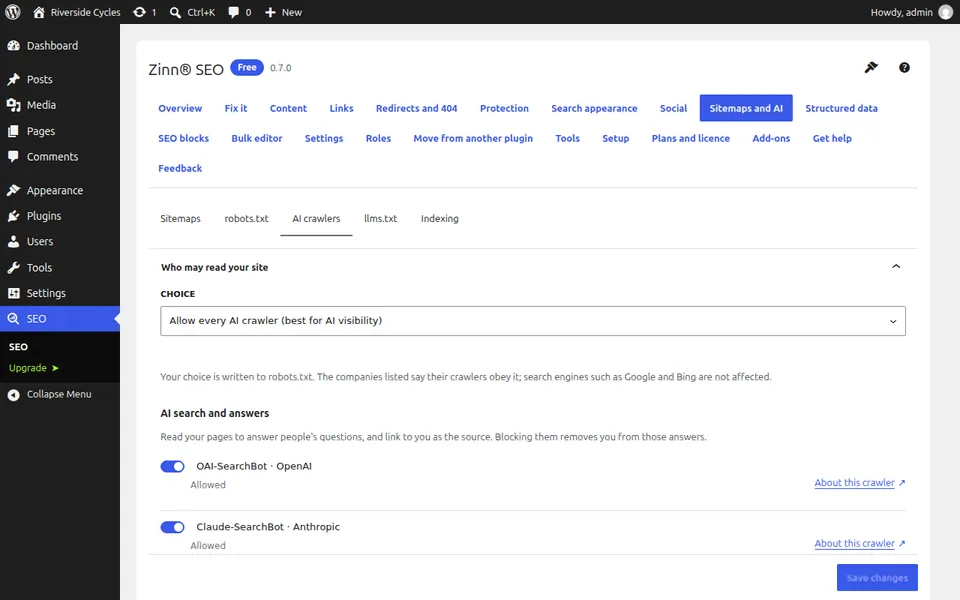
Open the AI crawlers tab
Go to SEO, Sitemaps and AI, AI crawlers. Crawlers are grouped into AI search and answers, Fetching for a person, and Training AI models.
Read what each group does
Blocking a crawler that answers questions removes your site from AI answers that would link to you. Blocking a crawler that trains models costs you nothing in search or in AI answers.
Pick a policy
Use the one-click choice to allow answers and block training, block every AI crawler, or choose My own choice and set each crawler yourself.
Save and test
Saving writes the rules into robots.txt. The robots.txt tab can test any address against any crawler.
Next guide: llms.txt for WordPress: publish yours for AI assistants
From the same team
Want fast hosting to go with it?
Zinn Digital® hosts WordPress on its own servers, with a CDN, DNS, TLS and daily backups included in every plan.