 Zinn® SEO
Use a focus phrase and the content analysis
Set the focus phrase (some plugins call it a focus keyphrase) a page should rank for and follow the SEO and readability checks while you write.
Zinn® SEO is not released yet. This guide shows how it works today.
Open the SEO sidebar in the editor
In the block editor, open the sidebar named Zinn® SEO. The classic editor, Page Builder Sandwich and Elementor have the same panel.
Enter a focus phrase
Type the phrase the page should be found for. Add synonyms if people search with other words. The free plugin allows three focus phrases per page.
Work through the SEO checks
The checks look at the title, the address, the opening paragraph, the headings and the text as visitors see them, including content from blocks and shortcodes.
Read the readability and accessibility results
Readability measures sentence and paragraph length and, where the language is supported, transition words and passive voice. Accessibility flags heading order, empty links and missing alt text.
Find pages that need work
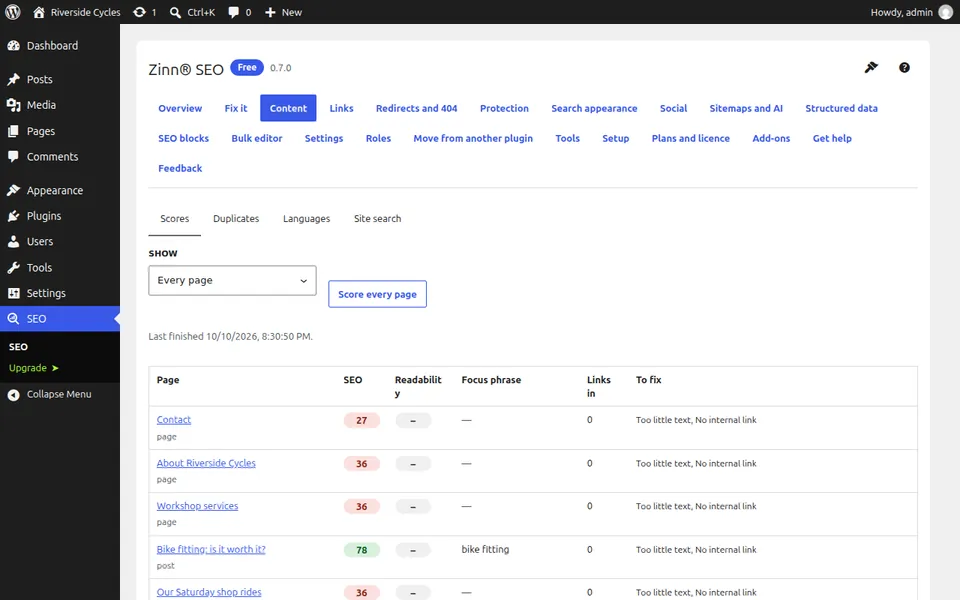
Under SEO, Content, the Scores tab lists every page with its score, and the post list has a needs-work filter.
Next guide: Edit SEO titles and descriptions in bulk
From the same team
Want fast hosting to go with it?
Zinn Digital® hosts WordPress on its own servers, with a CDN, DNS, TLS and daily backups included in every plan.