 Zinn® SEO
The Export / import settings screen
Copy all your SEO settings to another site with a file: download them here, import them there, and see every change before anything is applied. API keys and connections are never in the file.
Open Export / import settings
In WordPress, open SEO in the menu, then Export / import settings under Settings and tools in the plugin's side menu. Copy all your SEO settings to another site with a file: download them here, import them there, and see every change before anything is applied. API keys and connections are never in the file.
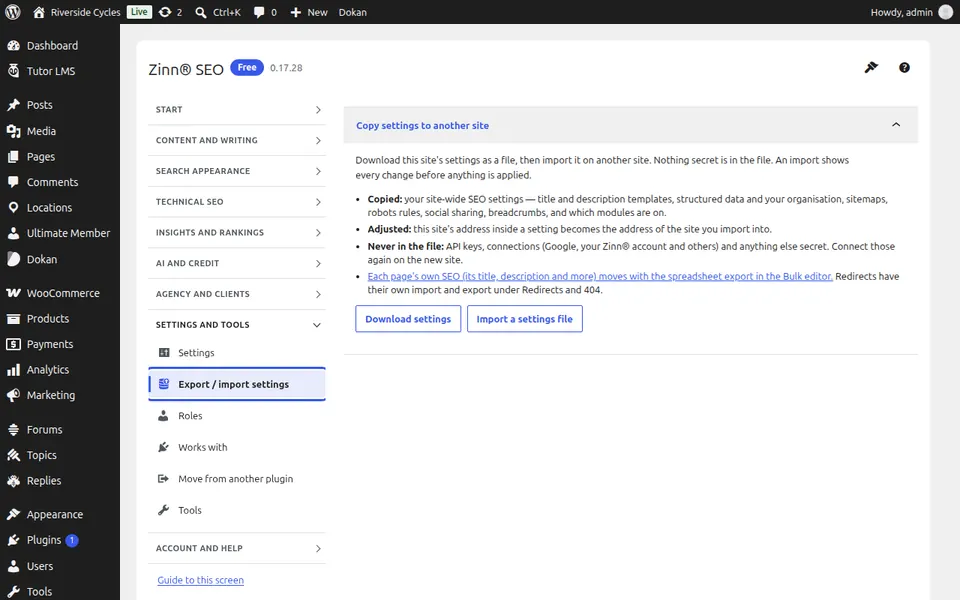
Use Export / import settings
Press Download settings to save the file. On the other site, open Export / import settings, press Import a settings file and choose the file: you see every setting it would change. Press Import these settings to apply them. Connect Google, your Zinn® account and any API keys again on the new site; redirects have their own import and export under Redirects and 404.
Step-by-step guides for this screen
Next guide: The Roles screen
From the same team
Want fast hosting to go with it?
Zinn Digital® hosts WordPress on its own servers, with a CDN, DNS, TLS and daily backups included in every plan.