 Zinn® SEO
XML sitemap in WordPress: where yours is and how to check it
Where the sitemap is, what it includes and how to read its health panel.
Zinn® SEO is not released yet. This guide shows how it works today.
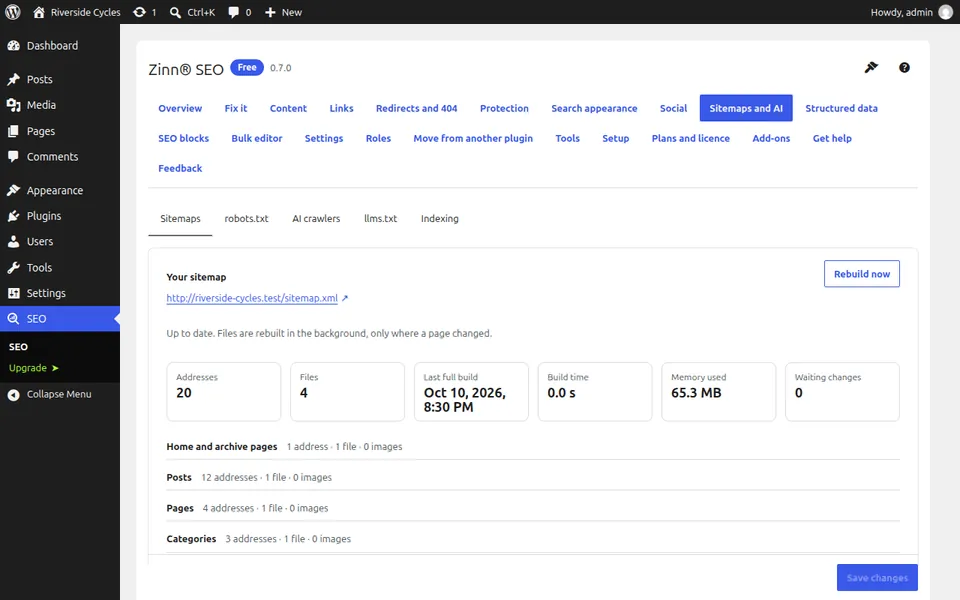
Open the Sitemaps tab
Go to SEO, Sitemaps and AI. The Sitemaps tab shows the number of addresses and files, the last full build, the build time and the memory used.
Open the sitemap
The sitemap is at /sitemap.xml on your site. In a browser it opens as a readable page in your language. In no-trace mode the tab shows its neutral address.
Choose what is listed
Leave out content types, taxonomies or single pages. Pages set to noindex, password-protected pages and pages that name another page as canonical are left out automatically.
Submit it once
Add the sitemap address in Google Search Console and Bing Webmaster Tools. robots.txt already names it for every search engine.
Let it keep itself up to date
An edit rebuilds only the file that lists the changed page. Waiting changes on the tab shows what the background job still has to write.
Next guide: Edit robots.txt in WordPress
From the same team
Want fast hosting to go with it?
Zinn Digital® hosts WordPress on its own servers, with a CDN, DNS, TLS and daily backups included in every plan.