 Zinn® SEO
Install Zinn® SEO
Upload the plugin, switch it on and you are ready for the guided setup.
Zinn® SEO is not released yet. This guide shows how it works today.
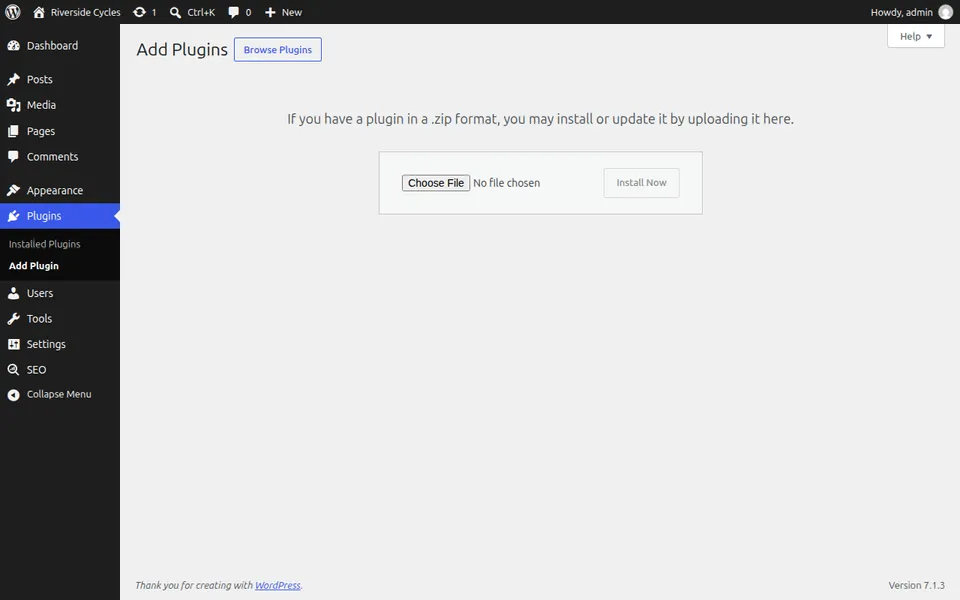
Open the Plugins screen
In WordPress go to Plugins, Add Plugin and press Upload Plugin.
Upload the zip file
Choose the zinn-seo.zip file and press Install Now.
Activate it
Press Activate. A new item called SEO appears in the WordPress menu.
Open SEO
Open SEO in the menu. The guided setup starts on its own and takes a few minutes.
Next guide: Run the Zinn® SEO guided setup
From the same team
Want fast hosting to go with it?
Zinn Digital® hosts WordPress on its own servers, with a CDN, DNS, TLS and daily backups included in every plan.