 Zinn® SEO
Edit robots.txt in WordPress
Change your robots.txt safely from WordPress, with checks that stop you blocking search engines by mistake.
Zinn® SEO is not released yet. This guide shows how it works today.
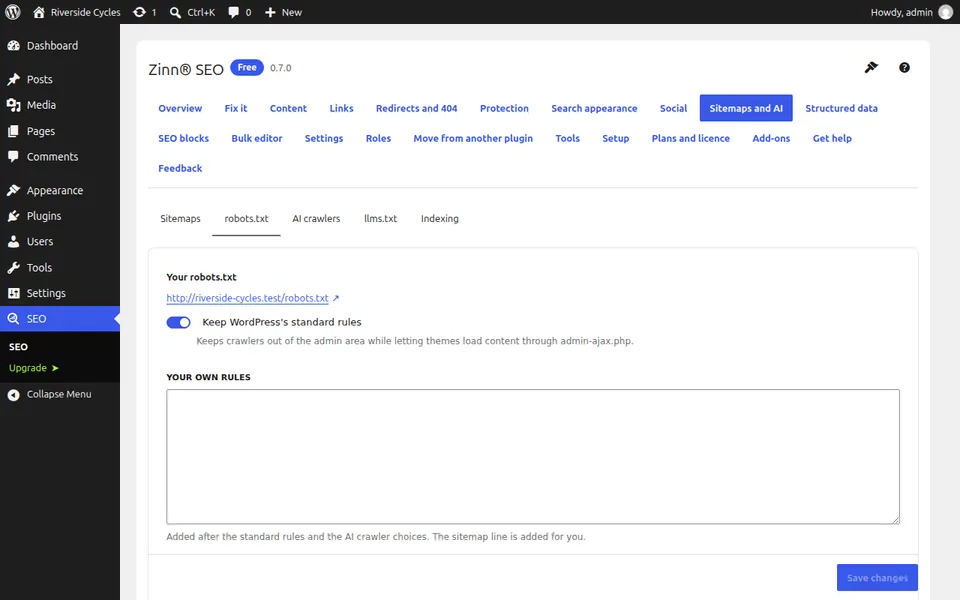
Open the robots.txt tab
Go to SEO, Sitemaps and AI, robots.txt. You see the file exactly as search engines receive it.
Edit your rules
Add or change rules in the editor. It checks them the way search engines read them and warns you about mistakes.
Test before you save
Type any address of your site, pick a crawler and see whether your rules would let it in. Save only when the answer is the one you want.
Have a real robots.txt file?
If a robots.txt file already sits on your server, Zinn® SEO tells you and can bring its rules in. On a staging copy of your site everything is blocked for you.
Next guide: Choose which AI crawlers may read your site
From the same team
Want fast hosting to go with it?
Zinn Digital® hosts WordPress on its own servers, with a CDN, DNS, TLS and daily backups included in every plan.