 Zinn® SEO
Move from Yoast, Rank Math or another SEO plugin
Bring your titles, descriptions and settings over from your current SEO plugin, check every page and switch over with an Undo.
Zinn® SEO is not released yet. This guide shows how it works today.
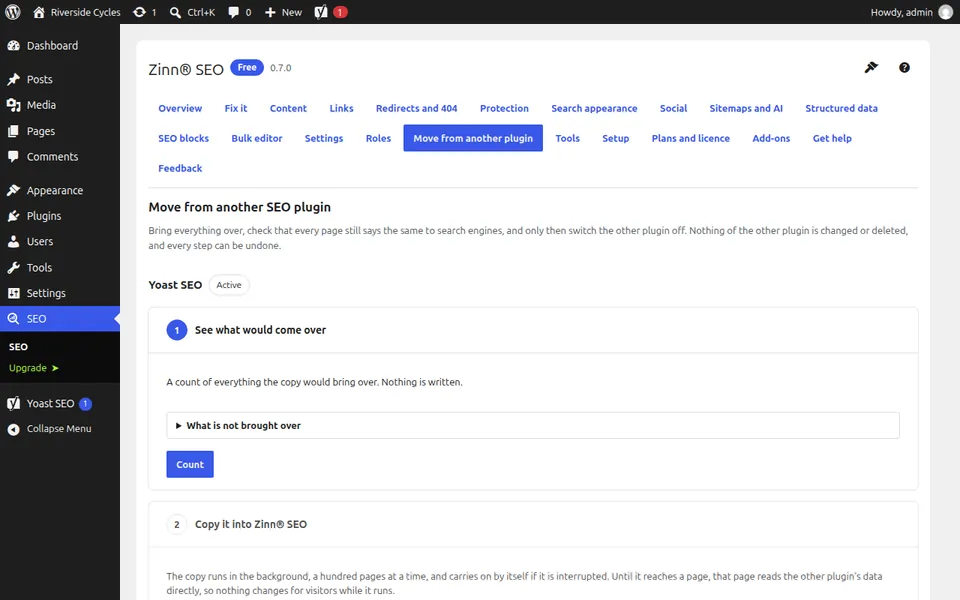
Open Move from another SEO plugin
Go to SEO, Move from another SEO plugin. Zinn® SEO lists the SEO plugins it found on your site. It can move you from Yoast SEO, Rank Math, All in One SEO, SEOPress, The SEO Framework, Slim SEO, Squirrly SEO and SmartCrawl.
See what would come over
In step 1, See what would come over, press Count. You get a count of titles, descriptions, settings and redirects. Nothing is changed yet.
Copy it into Zinn® SEO
In step 2, Copy it into Zinn® SEO, start the copy. It runs in the background and you can leave the screen. Your old plugin keeps working while it runs.
Compare every page
Next, compare every page. Each page is checked as your old plugin shows it against what Zinn® SEO would show, and any difference is listed for you.
Switch the old plugin off
When the pages say the same, one button switches the old plugin off and checks the pages again. Undo the import takes everything back, and nothing of the old plugin is deleted.
Next guide: Set your WordPress SEO title and meta description
From the same team
Want fast hosting to go with it?
Zinn Digital® hosts WordPress on its own servers, with a CDN, DNS, TLS and daily backups included in every plan.